How to Update a Live Leaderboard with Claude or ChatGPT (MCP)
Jarred Hess, Founder of MakeTheBoard
Connect a MakeTheBoard leaderboard to Claude, ChatGPT, Cursor or Claude Code as an MCP server, then update scores by pasting results or just asking.
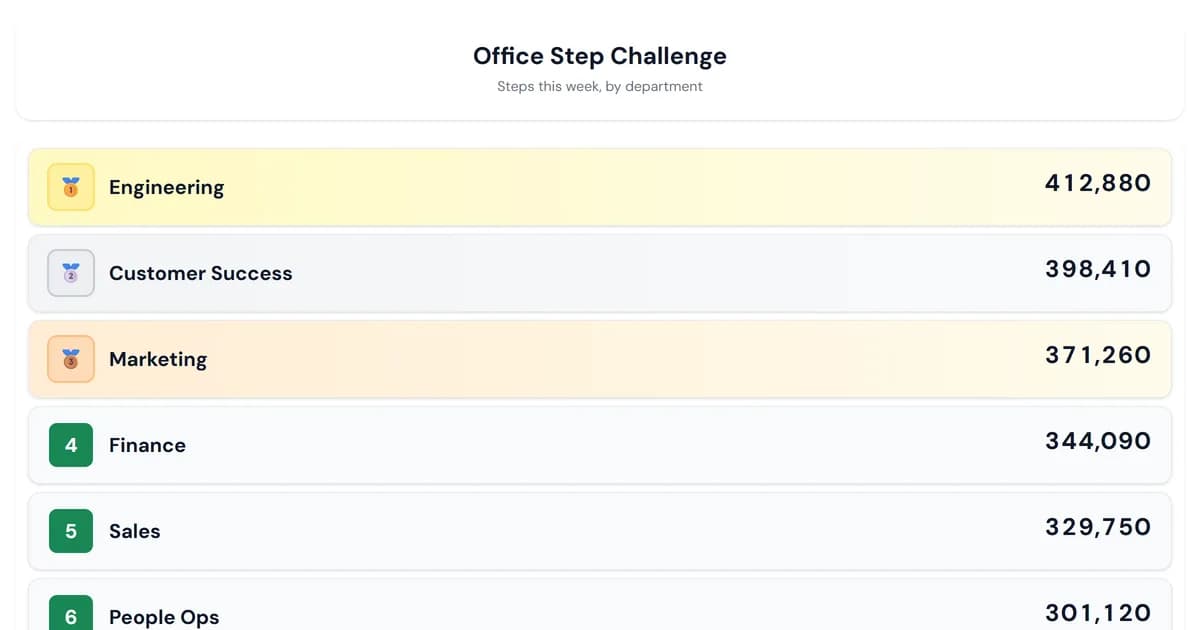
You can update a live MakeTheBoard leaderboard from Claude, ChatGPT, Cursor or Claude Code by adding the board as an MCP server. Copy the board's MCP address from Share → Editing access, add it to your assistant as a connector, and then just ask: "give the Blue team 10 points", "here are tonight's results, update the board", or "who's in third?" The assistant changes the scores and the board updates on every screen at once.
Below is what that looks like, how to set it up in each assistant, and what it's good for.
What the assistant can do
Every board's MCP server gives the assistant two tools:
| Tool | What it does | Changes data |
|---|---|---|
get_leaderboard | Reads the board: title, type, and everyone's rank and score | No |
update_scores | Sets a new total or adds and subtracts points, for one person or many at once | Yes |
That's deliberately small. The assistant can't delete the board, rename people, or change how it looks. It keeps the scoreboard; you run the event.
Setting it up
- Copy the address. In the board editor, open Share, then Editing access, and click Copy MCP address under Developer API. If editing access is off, click Create a management link first.
- Add it to your assistant:
- Claude: Settings → Connectors → Add custom connector, then paste the address.
- ChatGPT: turn on developer mode (Settings → Apps & Connectors → Advanced) and create a connector with the address and no authentication.
- Claude Code:
claude mcp add --transport http maketheboard <address> - Cursor or VS Code: add the address to your
mcp.json(the exact snippets are in the MCP guide).
- Ask a question to check it's connected: "What's on my leaderboard?"
There's nothing to install and no login. The address itself is the key, and it controls only that one board.
Five things people use it for
Quiz and trivia nights. Photograph the answer sheets or paste the round totals and say "add these to the board". Your assistant reads them and updates every team in one go while you read out the next question. Pair it with a trivia night scoreboard on the pub TV.
Sales leaderboards. Paste this week's closed deals from your CRM export and ask the assistant to set each rep's total. No more retyping numbers into a sales leaderboard every Friday.
Classroom points. "Give table 3 five points for cleanup and take two from table 1." The assistant does the arithmetic, and the classroom leaderboard on the projector updates while you keep teaching.
Step and wellness challenges. Forward the week's step counts as a list or spreadsheet and ask for the totals to be set. The assistant matches names to departments even when the capitals don't match.
Asking about the standings. "How far behind first is second place?" "Who moved up the most since Monday?" The assistant reads the live board and answers, which is handy before an announcement.
Tips for good results
- Let it read the board first. Assistants get names exactly right when they've seen the standings, so a first question like "what's on the board?" helps.
- Say "set" or "add". "Set Priya to 40" replaces her total; "add 5 to Priya" adjusts it. Clear wording means fewer surprises.
- Expect a confirmation. Most assistants ask before running a tool that changes data. That's normal, and it's a good last check.
- Batch it. "Here are all eight results" is one update; eight separate requests is eight.
- Add people in the editor. The assistant never creates new rows. Names it can't find come back as errors, so a typo can't add "Pirya" to your board.
What it works with
The MCP server works best on leaderboards and goal trackers, which rank by a single score. A scoresheet adds up its rounds, so a total set from outside is replaced the next time a round score changes. Brackets, tier lists and round-robin leagues use their own controls.
Connecting needs the board owner to be on Pro or Premium, the same as the developer API it's built on. Everyone watching the board, including on the TV display and website embeds, sees each change instantly.
Building your own agent?
The MCP server and the REST API take the same token and run the same scoring code. The whole reference, with request and response shapes, limits and client setup, is in one plain-markdown file at /developers.md. It's written to be read by AI coding agents as well as people.
Try it
Make a leaderboard, add your people, then copy its MCP address from Share. The MCP guide walks through each assistant step by step.
Frequently Asked Questions
Yes, if the leaderboard has an MCP server. Every MakeTheBoard board has one: add its address to Claude, ChatGPT, Cursor or Claude Code and the assistant can read the standings and set or adjust scores, and the live board updates instantly.
MCP (Model Context Protocol) is the standard way AI assistants connect to outside tools. An MCP server tells the assistant which actions it can take, such as reading a leaderboard or updating scores, and carries them out when asked.
In the board editor, open Share, then Editing access, and copy the MCP address under Developer API. It looks like https://maketheboard.com/api/mcp/ followed by your board's secret token. See the MCP guide for each assistant's setup.
Connecting and updating need the board owner to be on Pro or Premium, the same as the developer API. On a Free board the assistant can connect, but its calls explain that an upgrade is needed. Viewing and embedding the board stay free.
No. It can only change scores for people already on the board, matching names regardless of capitals. Add everyone in the editor first. Names it can't match are reported back instead of being created, so a typo never adds a stray row.
The address contains a secret that can change scores on that one board, so share it only with assistants and people you trust. If it leaks, regenerate the management link under Share, Editing access, which instantly disables the old address.
Ready to create your board?
Sign up free and build a leaderboard, scoreboard, or goal tracker in under a minute.
Create Your Board